Run normally
Your commands, model, tools, and project instructions continue to work as before.
 CodexZero
Less input. Same task score.
CodexZero recorded the largest token reduction in our completed comparisons. In the strongest repeated test, it used 15% fewer tokens and matched Codex’s task score.

Repeated benchmark
Codex and CodexZero each completed the same 12 software tasks three times. CodexZero matched the final score while processing 3.89 million fewer tokens.


Complete comparison
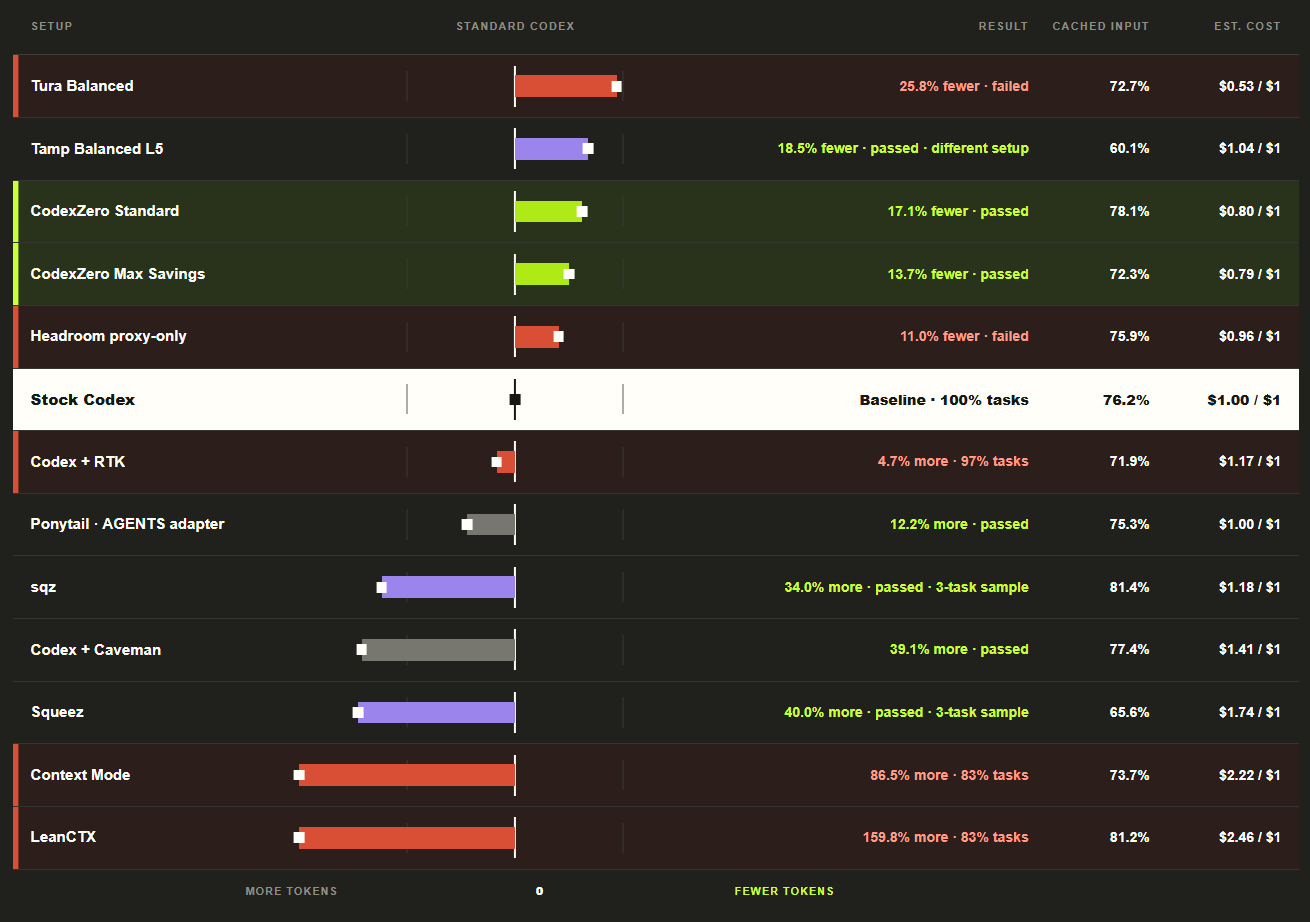
CodexZero Standard and Max Savings both completed the comparison with fewer tokens than stock Codex. Failed runs, different setups, and smaller samples are marked in the chart.
Install
curl -fsSL https://raw.githubusercontent.com/Retro2512/CodexZero/main/scripts/bootstrap.sh | sh
Windows desktop. macOS terminal.
Your existing Codex chats, skills and settings are ready.
How it works
CodexZero keeps the original command result available, removes repeated text when it can, and otherwise leaves the result alone.
Your commands, model, tools, and project instructions continue to work as before.
Repeated command output can be replaced with a shorter reading copy.
If nothing gets smaller, CodexZero sends the original result unchanged.
Three settings
Standard uses lean instructions with Codex’s direct tools. Focused adds batching for independent tool calls. Safe keeps the stock model instructions.
The fastest profile in the paired quick benchmark.
Batches independent tool calls for tool-heavy work.
Keeps Codex’s stock model instructions with CodexZero’s output handling.
Quick answers
No. It installs beside Codex, and codex-zero stock opens your regular setup.
It shortens eligible command results before the model reads them again. The full result stays available.
Focused can run independent tool calls together. Standard keeps tools direct and is the default.
CodexZero reduces the input tokens it changes. Your actual bill or plan usage also depends on output, caching, pricing, and your workload.
Ready when you are